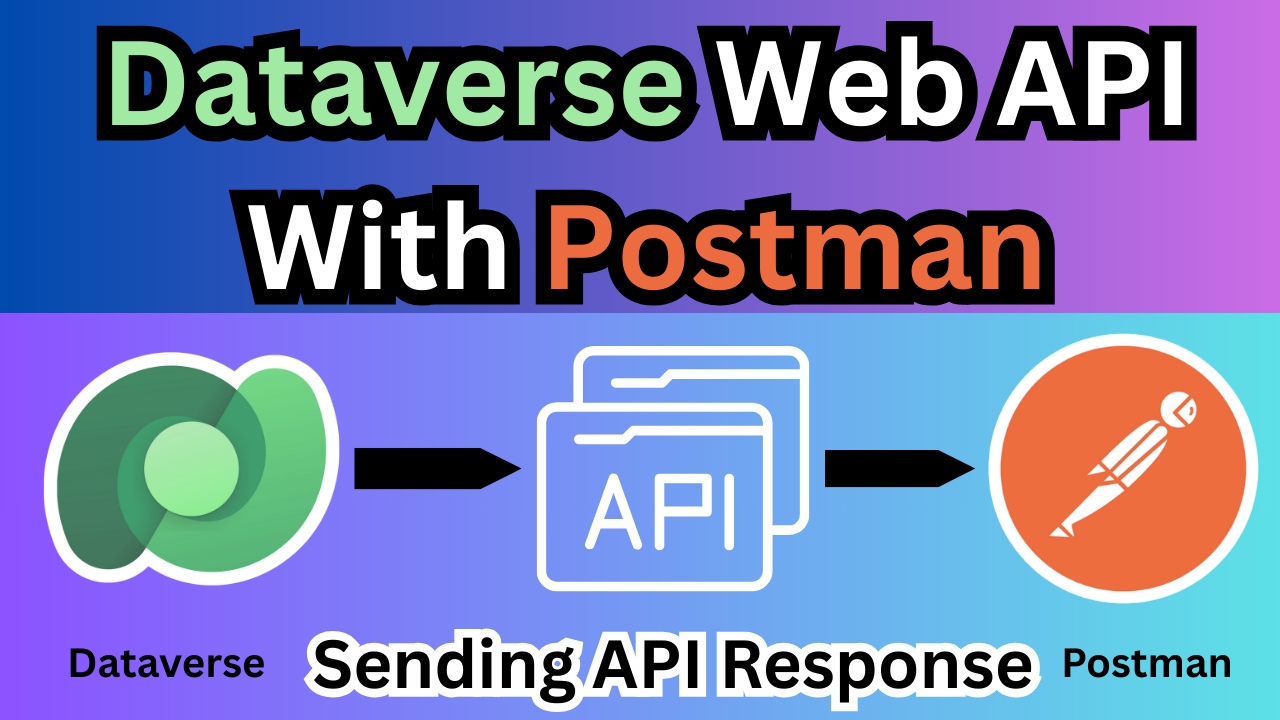
Dataverse Web Api with Postmen
How to Use Dataverse Web APIs with Postman (Step-by-Step Guide)
Microsoft Dataverse provides powerful REST Web APIs that allow developers and administrators to interact with tables, records, and metadata programmatically. Instead of writing code immediately, we can first test these APIs using Postman, which is the easiest and fastest way to understand how Dataverse works.
In this article, we will learn how to call Dataverse Web APIs using Postman and verify the responses in a simple step-by-step manner.
I will also show you how to quickly configure a Postman environment so you can start testing Dataverse APIs right away.
The best part is — you do not need to create a new Azure AD App Registration (Client ID and Client Secret). By following the steps below, you can use Microsoft’s public client application ID, which works across Dataverse environments for testing purposes.
Prerequisites
Before starting, make sure you have the following:
- A Microsoft Dataverse environment (Power Apps / Dynamics 365)
- Access to the environment (user account with permissions)
- Postman Desktop Application installed on your computer (Windows recommended)
Step 1 — Launch Postman
Open the Postman Desktop Application on your machine.
Step 2 — Create a Collection
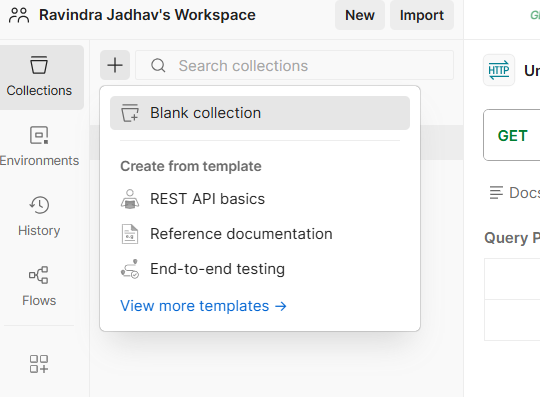
- In Postman, go to the Collections tab.
- Click New → Collection
- Name the collection:
Dataverse API GetLoginToken
This collection will store all your Dataverse requests (GET, POST, PATCH, DELETE).
Select Authentication Type Oauth2
Now enter the following details.
| Field | Value |
|---|---|
| Grant Type | Authorization Code |
| Callback URL | https://oauth.pstmn.io/v1/callback |
| Auth URL | https://login.microsoftonline.com/YOUR_TENANT_ID/oauth2/v2.0/authorize |
| Access Token URL | https://login.microsoftonline.com/YOUR_TENANT_ID/oauth2/v2.0/token |
| Client ID | 51f81489-12ee-4a9e-aaae-a2591f45987d |
| Client Secret | (leave blank) |
| Scope | https://YOURORG.crm.dynamics.com/.default |
| Client Authentication | Send as Basic Auth header |
Replace:
- YOUR_TENANT_ID → Azure Active Directory Tenant ID
- YOURORG → your Dataverse environment name
Then click Get New Access Token
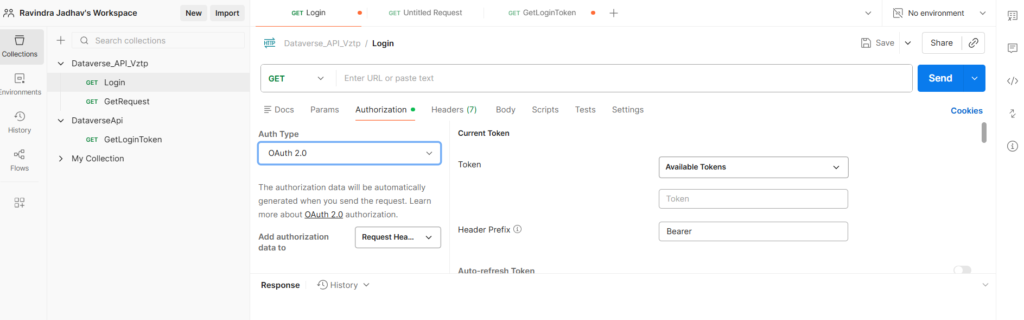
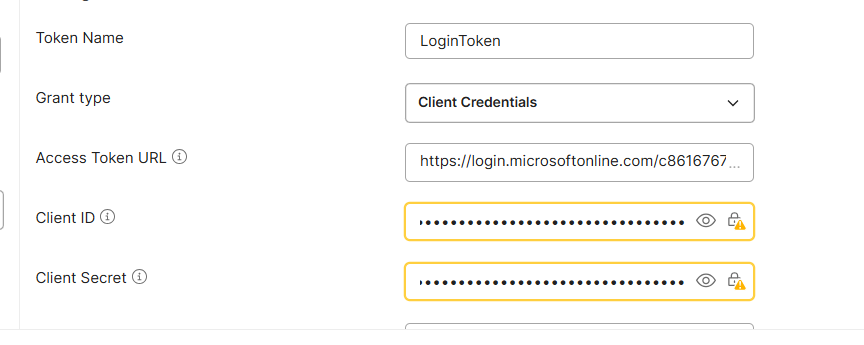
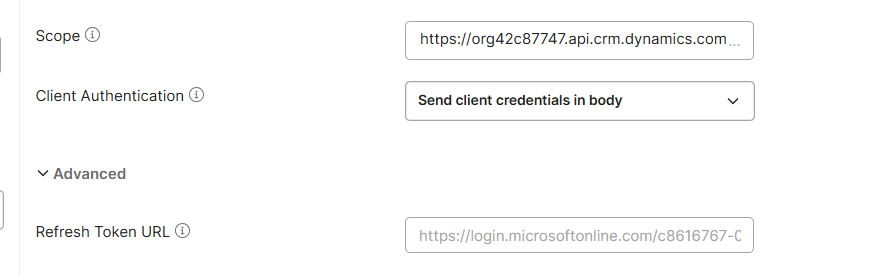
A Microsoft sign-in page will open → login → accept permissions.
After token is generated → click Use Token
Now all requests inside the collection are authenticated automatically.Then, click on new access token and proceed, then hit the END api Call
Step 2 — Call Dataverse API (GET Records)
Create a new request inside the collection.
Method: GET
Request URL
https://YOURORG.crm.dynamics.com/api/data/v9.2/accountsIf you want, I can also write the next sections (Environment variables, Access Token generation, OAuth URL, sample GET records request). That part is actually the most important for ranking because people search for “Dataverse API Postman access token”.
- dataverse web api postman
- call dataverse api using postman
- dataverse api access token postman
- microsoft dataverse rest api tutorial
- connect postman to dataverse
- dataverse api authentication postman
- dataverse oauth 2.0 postman
- dynamics 365 web api postman
- power apps dataverse api tutorial
- test dataverse api without code
- how to generate dataverse access token in postman
- how to connect microsoft dataverse to postman
- dataverse web api authorization code flow postman
- call dynamics 365 api using postman step by step
- dataverse api without client id and secret
- test power apps dataverse api using postman
- dataverse web api oauth authentication example
- get records from dataverse using rest api
- create record in dataverse using postman
- update dataverse record using patch request
- microsoft dataverse api example request
- dataverse api 401 unauthorized error fix
- dynamics crm web api tutorial for beginners
- dataverse api headers required
- retrieve accounts from dataverse api
- odata v9.2
- bearer token authorization
- azure active directory authentication
- oauth authorization code grant
- dynamics 365 integration
- power platform developer tutorial
- rest api testing tool
- http request headers
- json response dataverse
- dataverse tables accounts contacts
- Dataverse Web API with Postman (Step-by-Step Guide)
- How to Call Dataverse API Using Postman
- Connect Microsoft Dataverse to Postman Easily
- Dataverse API Authentication in Postman Tutorial
- Test Dynamics 365 Web API Using Postman
- Power Apps Dataverse API Postman Tutorial
- Generate Dataverse Access Token in Postman
- Call Dataverse REST API Without Coding
- Microsoft Dataverse API Beginner Guide
- Dataverse OAuth Authentication Postman Example
How to Use Microsoft Dataverse Web API with Postman (Complete Beginner Guide)
Step-by-Step Guide to Connect Postman with Dataverse and Generate Access Token
Microsoft Dataverse REST API Tutorial – Authentication, GET, POST & PATCH Using Postman
Call Dynamics 365 Dataverse API Using Postman Without Client ID or Secret
Power Apps Dataverse API Tutorial with Postman (OAuth 2.0 Authentication Explained)
Test Dataverse Web API in Postman and Retrieve Records from Accounts Table
How to Generate OAuth Access Token for Dataverse API in Postman
Dataverse Web API Authentication and CRUD Operations Using Postman
Microsoft Dataverse API Example Requests (GET, POST, PATCH, DELETE)
Learn Dataverse Web API Integration Using Postman from Scratch
Dataverse Web Api with Postmen
Dataverse Web Api with Postmen
Dataverse Web Api with Postmen
Dataverse Web Api with Postmen
Dataverse Web Api with Postmen
Dataverse Web Api with Postmen
Dataverse Web Api with Postmen
Dataverse Web Api with Postmen
Dataverse Web Api with Postmen
Dataverse Web Api with Postmen
✨ Thanks for reading! ✨
I hope you found this blog on the Microsoft Power Platform helpful! From Power Apps, Power Automate (Cloud & Desktop), Canvas Apps, Model-driven Apps, Power BI, Power Pages, SharePoint, Dynamics 365 (D365), Azure, and more, I cover a wide range of topics to help you harness these powerful tools. Don’t miss out on future tips, tutorials, and insights—hit that subscribe button to get the latest posts right to your inbox. 💌💬 I’d love to hear your thoughts! Drop a comment below with your questions, ideas, or feedback—let’s get the conversation started!🔗 Let’s connect and grow together!
Follow me, Ravindra Jadhav, on your favorite platforms for even more content and updates on Microsoft Power Platform and related technologies:
💼 LinkedIn – Let’s network and share ideas!
💻 GitHub – Explore my projects and code.
🐦 Twitter – Stay updated with quick tips and industry news.
📺 YouTube – Watch tutorials and deep dives on Power Platform, Power Apps, Power Automate, and more! Let’s build something amazing together with Power Platform and Azure! 🚀