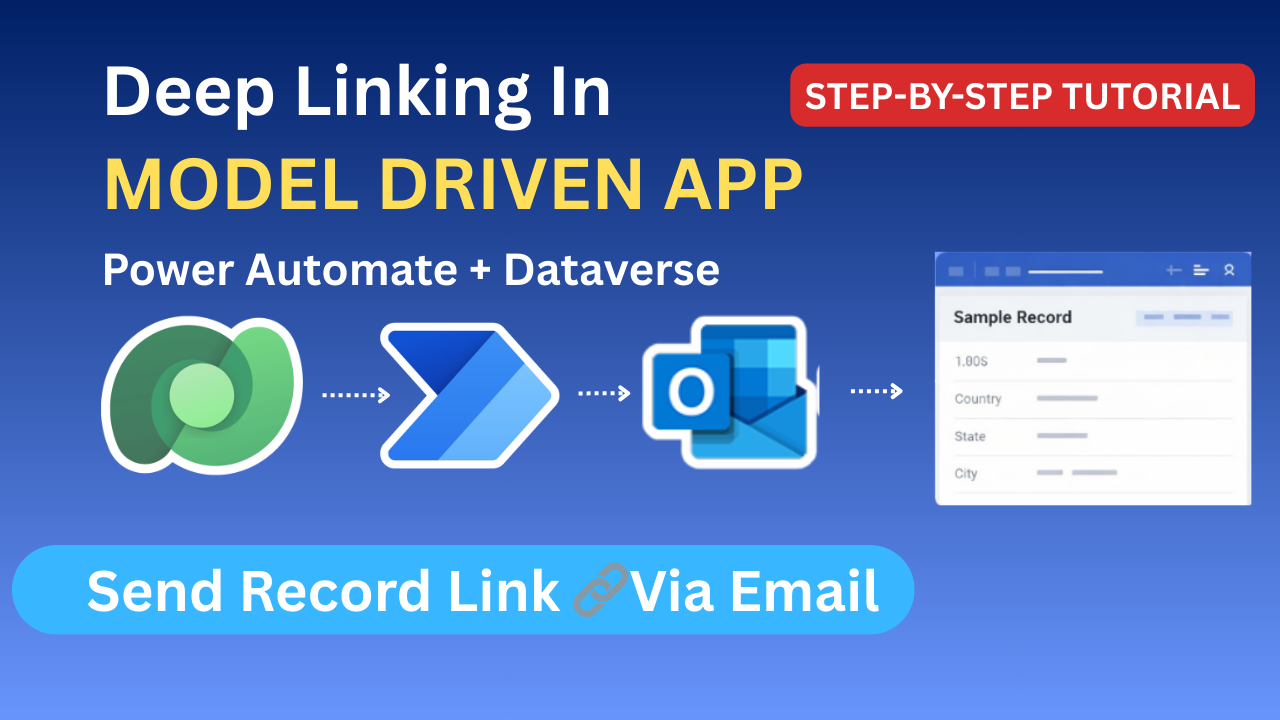
Deep Linking in Model-Driven Apps Using Power Automate
Send Record Details & Direct Record Link via Email (Step-by-Step Beginner Guide)
In real-world business applications, users expect instant notifications and easy access to records. Imagine this scenario:
A new record is created in a Master table
The user who created the record receives an email automatically
The email contains:
- Record details (Title, Country, State, City)
- A direct link that opens the record in the Model-Driven App
This is exactly where deep linking in Model-Driven Apps combined with Power Automate becomes extremely powerful.
In this article, we’ll build this solution from scratch, step by step, in a way that beginners can easily follow.
What You Will Learn in This Article
By the end of this guide, you will learn:
- What deep linking is in Model-Driven Apps
- Why deep linking is important in real business scenarios
- How to create a Power Automate flow triggered by record creation
- How to fetch record details from Dataverse
- How to get the record creator’s email
- How to build a deep link URL for a Model-Driven App record
- How to send a professional HTML email with a clickable button
- Common mistakes and best practices
What Is Deep Linking in Model-Driven Apps?
Deep linking means creating a direct URL that opens a specific record inside a Model-Driven App, instead of just opening the app homepage.
Without Deep Linking
- User clicks a generic app link
- Needs to:
- Open the app
- Search for the table
- Find the record manually
With Deep Linking
- User clicks a link
- The exact record opens immediately
- Saves time and improves productivity
Real-World Use Case
Let’s understand the use case clearly:
Business Requirement
- A record is created in a Master Data table
- The system should:
- Automatically send an email
- Email should go to the user who created the record
- Email should include:
- Record details
- A button to open the record
Tools Used
- Microsoft Dataverse
- Model-Driven App
- Power Automate
- Outlook (Send Email V2)
Solution Architecture Overview
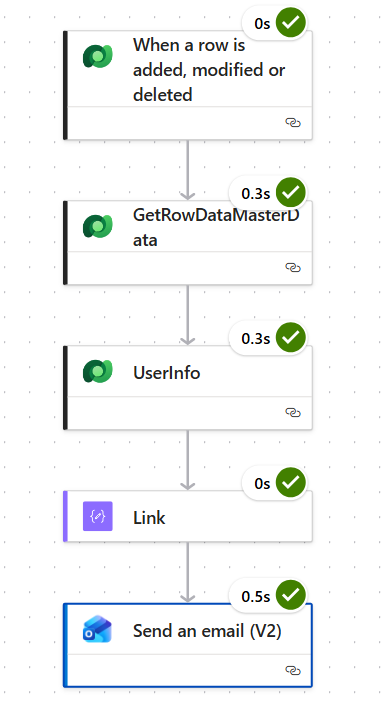
Here is how the solution works end to end:
- Record is created in Dataverse
- Power Automate flow triggers
- Flow fetches:
- Record details
- User (Created By) information
- Flow builds a deep link URL
- Flow sends an HTML email with:
- Record details
- “Open Record” button
Step 1: Create the Trigger (Dataverse)
Action Used
When a row is added, modified or deleted
Configuration
- Change type: Added
- Table name:
Master Data(your table) - Scope: Organization (recommended)
This ensures the flow runs only when a new record is created.
Step 2: Get Record Details (Get Row by ID)
Even though the trigger contains some data, best practice is to explicitly fetch the full record.
Action Used
Get a row by ID
Configuration
- Table name:
Master Data - Row ID:
@{triggerOutputs()?['body/rj_masterdataid']}
This step ensures:
- You get formatted values
- Lookup display names (Country, State, City)
- Clean and reliable data
Step 3: Get User Information (Created By)
The email should be sent to the user who created the record.
Action Used
Get a row by ID (Users table)
Configuration
- Table name: Users
- Row ID:
@{triggerOutputs()?['body/_createdby_value']}
From this step, you’ll get:
- Full name
- Primary email
- Business unit (optional)
Step 4: Build the Deep Link (Compose Action)
Now comes the most important part: building the deep link.
Model-Driven App Record URL Structure
https://ORG.crm.dynamics.com/main.aspx
?appid=APP_ID
&pagetype=entityrecord
&etn=TABLE_SCHEMA_NAME
&id=RECORD_GUID
Example Compose Expression
concat(
  'https://org42c87747.crm.dynamics.com/main.aspx?appid=7b6a0e7b-4713-f111-8343-7c1e52164834',
  '&pagetype=entityrecord',
  '&etn=rj_masterdata',
  '&id=',
  outputs('GetRowDataMasterData')?['body/rj_masterdataid']
)
This creates a dynamic deep link that opens the exact record.
Step 5: Design the HTML Email (Outlook)
Why HTML Email?
- Professional look
- Structured layout
- Button instead of long URL
- Better user experience
Sample HTML Email Template (Beginner Friendly)
<div style="max-width:600px;
    margin:20px auto;
    padding:20px;
    font-family:Arial, Helvetica, sans-serif;
    border:1px solid #e0e0e0;
    border-radius:8px;
    background-color:#ffffff;">    <h2 style="margin-top:0;
        color:#2c3e50;
        border-bottom:1px solid #dddddd;
        padding-bottom:10px;">
        New Record Created
    </h2>    <p style="font-size:14px;">
        <strong>Title:</strong><br />
        @{triggerOutputs()?['body/rj_title']}
    </p>    <p style="font-size:14px;">
        <strong>Country:</strong><br />
        @{outputs('GetRowDataMasterData')?['body/_rj_country_value@OData.Community.Display.V1.FormattedValue']}
    </p>    <p style="font-size:14px;">
        <strong>State:</strong><br />
        @{outputs('GetRowDataMasterData')?['body/_rj_state_value@OData.Community.Display.V1.FormattedValue']}
    </p>    <p style="font-size:14px;">
        <strong>City:</strong><br />
        @{outputs('GetRowDataMasterData')?['body/_rj_city_value@OData.Community.Display.V1.FormattedValue']}
    </p>    <div style="text-align:center;margin-top:25px;">
        <a href="@{outputs('Link')}"
           style="background-color:#0078d4;
                  color:#ffffff;
                  padding:12px 24px;
                  text-decoration:none;
                  font-size:14px;
                  border-radius:5px;
                  display:inline-block;">
            Open Record
        </a>
    </div></div>
Step 6: Send Email (V2)
Action Used
Send an email (V2)
Configuration
- To:
@{outputs('UserInfo')?['body/internalemailaddress']}
- Subject:
New Master Record Created – @{triggerOutputs()?['body/rj_title']}
- Body:
- Paste HTML
- Set Is HTML = Yes
Final Result (User Experience)
When a user creates a record:
✅ They instantly receive an email
✅ Email contains clean, readable record details
✅ One click opens the record in the Model-Driven App
✅ No searching, no confusion
This dramatically improves:
- User experience
- Adoption
- Productivity
Common Mistakes to Avoid
❌ Using @{} around static URLs
❌ Forgetting pagetype=entityrecord
❌ Using table display name instead of schema name
❌ Not enabling HTML in email
❌ Hardcoding record IDs
Best Practices
✔ Always use Compose for building URLs
✔ Use formatted values for lookups
✔ Keep email layout simple (Outlook-friendly CSS)
✔ Use buttons instead of raw URLs
✔ Test links with different security roles
Conclusion
Deep linking in Model-Driven Apps is one of the most powerful yet underused features in the Power Platform.
By combining:
- Dataverse
- Power Automate
- HTML emails
- Model-Driven App URLs
You can build enterprise-grade notifications that feel seamless and professional.
This pattern can be reused for:
- Approval notifications
- Record assignment emails
- SLA alerts
- Audit tracking
- Business workflows
✨ Thanks for reading! ✨
I hope you found this blog on the Microsoft Power Platform helpful! From Power Apps, Power Automate (Cloud & Desktop), Canvas Apps, Model-driven Apps, Power BI, Power Pages, SharePoint, Dynamics 365 (D365), Azure, and more, I cover a wide range of topics to help you harness these powerful tools. Don’t miss out on future tips, tutorials, and insights—hit that subscribe button to get the latest posts right to your inbox. 💌💬 I’d love to hear your thoughts! Drop a comment below with your questions, ideas, or feedback—let’s get the conversation started!🔗 Let’s connect and grow together!
Follow me, Ravindra Jadhav, on your favorite platforms for even more content and updates on Microsoft Power Platform and related technologies:
💼 LinkedIn – Let’s network and share ideas!
💻 GitHub – Explore my projects and code.
🐦 Twitter – Stay updated with quick tips and industry news.
📺 YouTube – Watch tutorials and deep dives on Power Platform, Power Apps, Power Automate, and more! Let’s build something amazing together with Power Platform and Azure! 🚀
SEO DATA
How to Create Deep Links in Model-Driven Apps Using Power Automate (Step-by-Step)
Send Dataverse Record Links via Email Using Power Automate & Model-Driven Apps
Power Automate Deep Linking Tutorial for Model-Driven Apps (Beginner Guide)
Automatically Email Model-Driven App Record Links Using Power Automate
Deep Linking in Dataverse Model-Driven Apps Explained with Real-World Example
deep linking model driven apps
power automate dataverse record link
model driven app record url
power automate send email html
dataverse deep link
open model driven app record from email
power platform automation
Deep Linking in Model-Driven Apps
Deep Linking in Model-Driven Apps
Deep Linking in Model-Driven Apps
Deep Linking in Model-Driven Apps
Deep Linking in Model-Driven Apps
Deep Linking in Model-Driven Apps