Power Apps Interview Questions 2026
1.What is Power Apps?
Power Apps is a low-code application development platform from Microsoft that allows organisations to build custom business applications quickly with minimal coding. It is part of the Microsoft Power Platform and integrates seamlessly with tools like Microsoft 365, SharePoint, Dataverse, SQL, and Dynamics 365.
In 2026, Power Apps has evolved with strong AI capabilities through Copilot, enabling makers to build apps using natural language and automate logic faster. It supports Canvas apps, Model-driven apps, and professional developer extensions like PCF components.
It helps businesses digitise manual processes, improve productivity, and reduce development time while maintaining enterprise-level security and governance.
2.Describe the different types of apps? explain this point in detail
1️⃣ Canvas Apps
- Design-first approach (full control over UI).
- Built using drag-and-drop components.
- Uses Power Fx (Excel-like formula language).
- Connects to 1000+ data sources (SharePoint, Dataverse, SQL, etc.).
- Best for mobile-friendly and highly customised apps.
Example: Leave management, inspection app.
2️⃣ Model-Driven Apps
- Data-first approach (built on Dataverse).
- UI auto-generated from tables and relationships.
- Supports business rules, workflows, and role-based security.
- More structured and enterprise-ready.
Example: CRM, case management system.
3️⃣ Power Pages
- Used to build external-facing websites/portals.
- Secure access for customers, vendors, or partners.
- Integrated with Dataverse.
- Supports authentication and role-based access.
Example: Vendor registration portal.
4️⃣ Code Apps (Introduced for Pro Developers)
- Full-code development inside Power Platform.
- Built using frameworks like React.
- Hosted and governed within Power Platform.
- Suitable for complex enterprise scenarios.
- Combines low-code governance with pro-code flexibility.
Example: Complex enterprise web application with advanced logic.
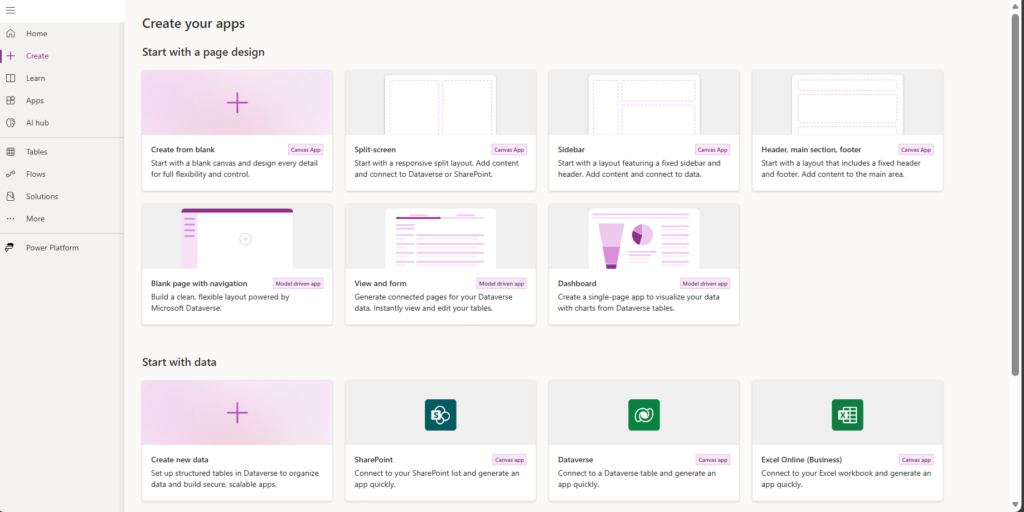
3: How do you create a Canvas App?
When creating a Canvas App, the approach depends on business requirements, data architecture, and governance strategy.
1️⃣ If the requirement is highly customised UI or complex business logic, I start with a blank app, which gives full design and performance control.
2️⃣ For standard CRUD scenarios, I prefer creating the app from a data source, as it accelerates development by generating the basic screens automatically.
3️⃣ In 2026, I also leverage Copilot-based app generation to quickly scaffold apps, especially during prototyping or requirement workshops.
4️⃣ For enterprise projects, I always create the Canvas App inside a Solution to support proper ALM, environment promotion, and managed deployments.
5️⃣ Templates are useful for quick proofs of concept but are usually refactored for production-grade applications.
Overall, my decision depends on scalability, maintainability, and governance requirements rather than just speed of development.
4: What is the purpose of Common Data Service (CDS)?
Common Data Service (CDS), now called Microsoft Dataverse, is a secure cloud-based data storage platform used by various applications.
Purpose of CDS / Dataverse:
•Store business data securely
•Provide standardized data schema
•Enable data sharing across Power Platform
•Support role-based security
•Improve performance and scalability
“Dataverse acts as the backbone of Power Apps applications.”
5: How do you connect applications to data sources?
Steps to Connect a Data Source:
1.Open make.powerapps.com
2.Create or open a Power App
3.Click on Data → Add data
4.Choose a connector (SharePoint, Dataverse, SQL, Excel, etc.)
5.Select the required table or list
Supported Data Sources:
•SharePoint Lists
•Microsoft Dataverse
•SQL Server / Azure SQL
•Excel / OneDrive
•Dynamics 365
•APIs via custom connectors
Power Apps can connect to cloud and on-premises data sources using the on-premises data gateway.
6: What is a form in Power Apps?
A form in Power Apps is a control used to display, create, edit, or submit data to a data source.
Types of Forms:
1.Display Form – View data only
2.Edit Form – Update existing records
3.New Form – Create new records
Key Form Properties:
•DataSource
•Item
•DefaultMode
•SubmitForm()
Example:
A form is used in a leave request app to submit employee leave detail
7: Explain the use of controls in Power Apps
In Power Apps, controls are the fundamental building blocks of a Canvas App. As a senior developer, I use controls not just for UI design but as part of an overall application architecture strategy.
First, data controls like Forms and Galleries are used to display and manage structured data. I design them with delegation in mind to ensure performance and scalability, especially when working with large datasets.
Second, input controls such as Text inputs, Combo boxes, and Date pickers are used to capture user data. I implement validation logic, conditional formatting, and business rules to ensure data integrity and better user experience.
Third, action controls like Buttons and Icons trigger business logic. I ensure proper state management, loading indicators, and error handling to make applications reliable and user-friendly.
Fourth, layout controls such as Containers help build responsive applications. In 2026, responsive design is critical, so I use flexible containers instead of fixed positioning.
Finally, I focus on reusability and maintainability by using custom components and PCF controls where needed. This reduces duplication and technical debt in enterprise applications.
Overall, control selection is based on performance, usability, accessibility, and long-term maintainability — not just visual appearance.
8: What are connectors in Power Apps?
Connectors are prebuilt or custom interfaces that allow applications to communicate with external data sources and services.
Types of Connectors:
1.Standard Connectors – SharePoint, Excel, Outlook
2.Premium Connectors – SQL, Salesforce
3. Custom Connectors – APIs built using Swagger/OpenAPI
Why Connectors Are Important:
•Enable data integration
•Reduce manual coding
•Support automation across services
9: How do you publish an app in Power Apps?
Publishing an app makes it available for users to access and use.
Steps to Publish:
1.Save the app
2.Click Publish
3.Select Publish this version
4.Share the app with users or groups
5.Assign permissions (User / Co-owner)
After Publishing:
•App appears in Power Apps portal
•Users can access via web or mobile app
Only the published version is visible to end users.
10: What are variables in Power Apps?
Variables in Power Apps are used to store temporary data in memory during app runtime. They help control app behavior, manage state, and store values such as user selections, flags, counters, or intermediate results.
Variables do not store data permanently—their values are reset when the app is closed or refreshed.
1️⃣ Global Variables : Global variables are accessible across all screens in the app. Once created, they can be used anywhere.
Set(varUserEmail, User().Email)
Global variables are best when the value needs to be reused across multiple screens.
2️⃣ Context Variables : Context variables are screen-specific variables. They are only available within the screen where they are created.
UpdateContext({varShowPopup: true})
Context variables improve performance and are useful for local screen logic.
✨ Thanks for reading! ✨
I hope you found this blog on the Microsoft Power Platform helpful! From Power Apps, Power Automate (Cloud & Desktop), Canvas Apps, Model-driven Apps, Power BI, Power Pages, SharePoint, Dynamics 365 (D365), Azure, and more, I cover a wide range of topics to help you harness these powerful tools. Don’t miss out on future tips, tutorials, and insights—hit that subscribe button to get the latest posts right to your inbox. 💌
💬 I’d love to hear your thoughts! Drop a comment below with your questions, ideas, or feedback—let’s get the conversation started!
🔗 Let’s connect and grow together!
Follow me, Sanika Thorat, on your favorite platforms for even more content and updates on Microsoft Power Platform and related technologies:
- 💼 LinkedIn – Let’s network and share ideas!
- 💻 GitHub – Explore my projects and code.
- Email Id – thoratsanika98@gmail-com
Let’s build something amazing together with Power Platform and Azure! 🚀
Power Apps Mostly Asked Interview Questions and Answers 2026
Power Apps Interview Questions 2026
Power Apps Canvas App Tutorial
Power Apps Model-Driven App Guide
Power Apps Copilot Features
Power Apps Code Apps 2026
Power Apps PCF Tutorial
Power Fx Examples
Power Apps Performance Optimization
Power Apps ALM Best Practices
Power Apps vs Model-Driven Apps
Power Apps Interview Questions 2026
Build a Complete Canvas App Step by Step
Power Apps Real Project Demo
Power Apps Mistakes Beginners Make
Thank You