How to Update Dataverse Records Using Postman (PATCH Request – Step-by-Step Guide)
Update Dataverse Table Values Using Postman
In this guide, you will learn how to update a Dataverse contact record using Postman with a real working example based on OAuth 2.0 and PATCH request.
🔍 What You Will Learn
- How to configure OAuth 2.0 Authorization in Postman
- How PATCH request works in Dataverse
- How to update a contact record using Web API
- Real example using Postman collection
🔐 Authorization Setup in Postman (OAuth 2.0)
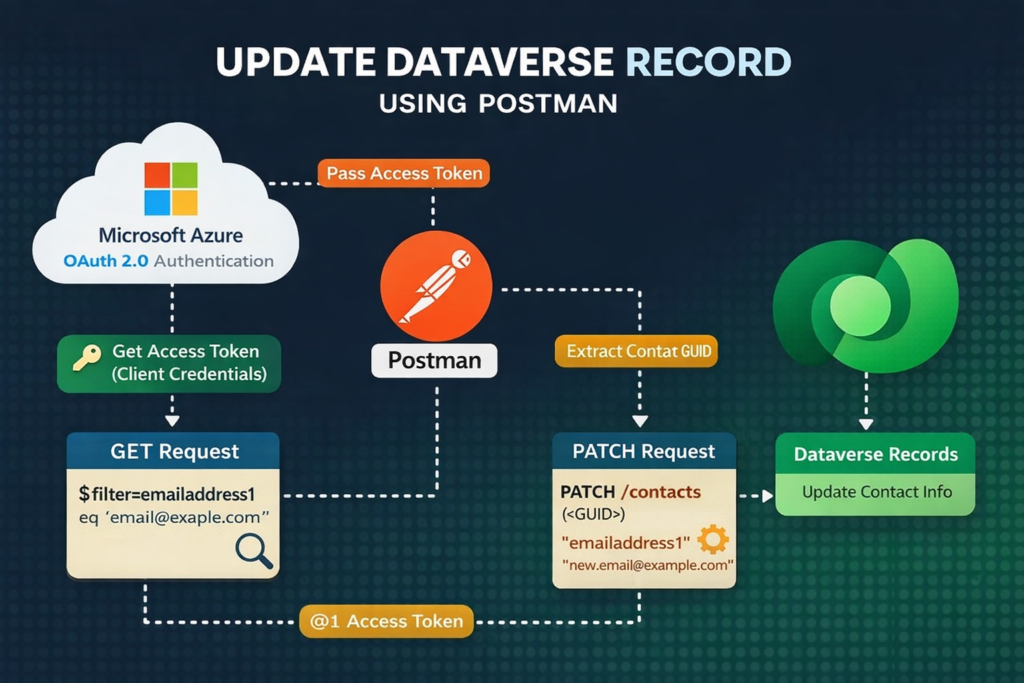
Before updating any record, you must authenticate with Dataverse using OAuth 2.0 Client Credentials Flow.
⚙️ Configuration (Based on Real Example)
Use the following settings in Postman:
- Grant Type: Client Credentials
- Access Token URL:
https://login.microsoftonline.com/{tenant-id}/oauth2/v2.0/token
- Client ID: Your App Registration ID
- Client Secret: Your Secret
- Scope:
https://yourorg.api.crm.dynamics.com/.default
🧠 How Authorization Works
- Postman sends credentials to Azure AD
- Azure validates your application
- Returns an Access Token
- Token is automatically added:
Authorization: Bearer <access_token>
✅ Pro Tips
- Use client credentials for backend automation
- Regenerate token when expired
- Keep client secret secure
✏️ PATCH Request – Update Dataverse Record
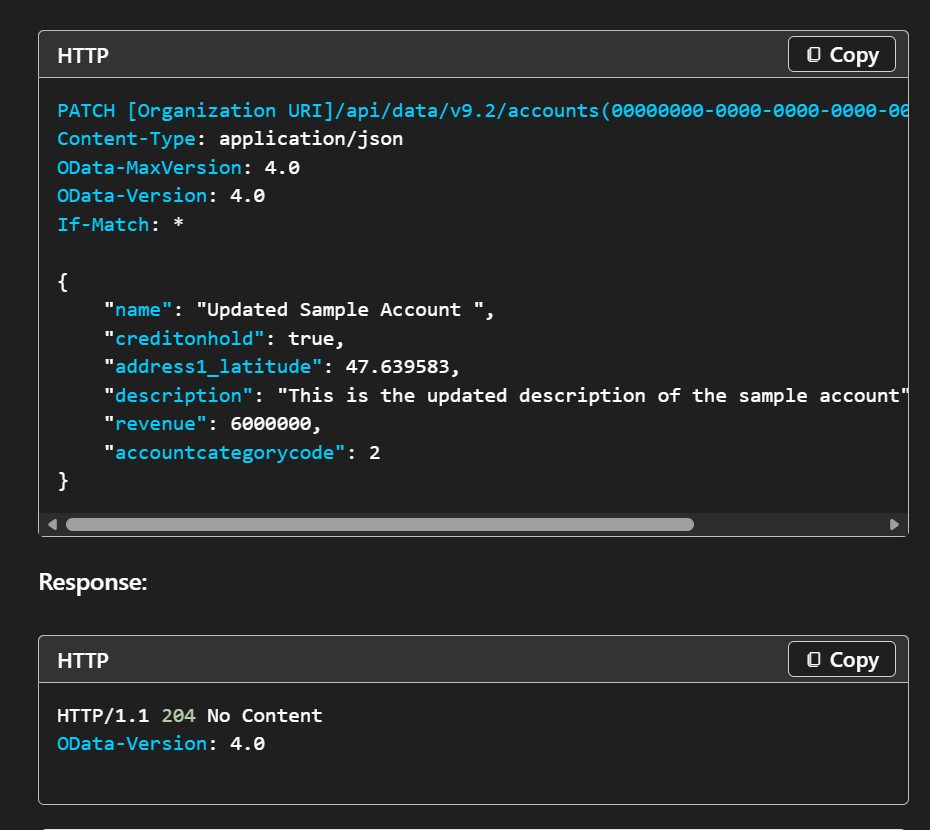
PATCH is used to update existing records in Dataverse.
📌 Endpoint Format
PATCH https://yourorg.api.crm.dynamics.com/api/data/v9.2/contacts(<GUID>)
📌 Real Example
PATCH https://org42c87747.api.crm.dynamics.com/api/data/v9.2/contacts(6fb0be69-35d1-ef11-a730-6045bdd72118)
📌 Required Headers
Authorization: Bearer <access_token>
Content-Type: application/json
OData-Version: 4.0
OData-MaxVersion: 4.0
If-Match: *
🔍 Why If-Match: * is Important
- Ensures the request only updates an existing record
- Prevents accidental record creation (Upsert)
📌 Request Body Example
{
  "emailaddress1": "jravindra123@gmail.com"
}
🧠 What Happens Here?
- Only the emailaddress1 field is updated
- Other fields remain unchanged
- Efficient and fast update
📌 Successful Response
204
✅ What It Means
- Record updated successfully
- No response body returned
🔄 Real-World Flow (Used in Your Collection)
Step 1: Identify Record (Already Covered)
- Use email to find contact
Step 2: Get Contact GUID
- Extract unique ID
Step 3: Update Using PATCH
- Use GUID in endpoint
- Send only fields to update
⚡ Best Practices for Dataverse PATCH API
✔ Update only required fields
✔ Always use correct GUID
✔ Use If-Match header
✔ Secure your credentials
✔ Test APIs in Postman before production
❗ Common Errors & Fixes
🔴 401 Unauthorized
- Token missing or expired
🔴 404 Not Found
- Incorrect GUID
🔴 412 Precondition Failed
📌 Final Thoughts
Using Postman with Dataverse Web API makes it easy to test and implement real-world integrations.
With just:
✔ OAuth 2.0 Authorization
✔ PATCH request
✔ Proper headers
You can build powerful integrations with:
- Power Apps
- Power Automate
- External systems
🔥 Bonus Tip
Always rotate your client secret if it is exposed in shared files or collections to keep your environment secure.
✨ Thanks for reading! ✨
I hope you found this blog on the Microsoft Power Platform helpful! From Power Apps, Power Automate (Cloud & Desktop), Canvas Apps, Model-driven Apps, Power BI, Power Pages, SharePoint, Dynamics 365 (D365), Azure, and more, I cover a wide range of topics to help you harness these powerful tools. Don’t miss out on future tips, tutorials, and insights—hit that subscribe button to get the latest posts right to your inbox. 💌💬 I’d love to hear your thoughts! Drop a comment below with your questions, ideas, or feedback—let’s get the conversation started!🔗 Let’s connect and grow together!
Follow me, Ravindra Jadhav, on your favorite platforms for even more content and updates on Microsoft Power Platform and related technologies:
💼 LinkedIn – Let’s network and share ideas!
💻 GitHub – Explore my projects and code.
🐦 Twitter – Stay updated with quick tips and industry news.
📺 YouTube – Watch tutorials and deep dives on Power Platform, Power Apps, Power Automate, and more! Let’s build something amazing together with Power Platform and Azure! 🚀
SEO
- Dataverse Web API PATCH request
- Update Dataverse record using Postman
- Power Platform Web API tutorial
- Dataverse API authentication OAuth 2.0
- Update contact record Dataverse API
- PATCH request in Dataverse example
Update Dataverse Table Values Using Postman
Update Dataverse Table Values Using Postman
Update Dataverse Table Values Using Postman
Update Dataverse Table Values Using Postman
Update Dataverse Table Values Using Postman
Update Dataverse Table Values Using Postman
Update Dataverse Table Values Using Postman
Update Dataverse Table Values Using Postman