
Top 10 Dynamics 365 CRM Interview Questions and Answers for 2026
Dynamics 365 CRM Interview Questions
Are you preparing for a Dynamics 365 CRM interview in 2026?
Whether you are applying for a role as a Dynamics 365 Developer, Power Platform Developer, Functional Consultant, or CRM Consultant, understanding the core concepts of Dynamics 365 and Microsoft Dataverse is essential.
Dynamics 365 interviews frequently include questions about:
- Microsoft Dataverse
- Tables and columns
- Relationships
- Solutions
- Managed and unmanaged solutions
- Business Rules
- JavaScript
- Security Roles
- Power Automate
In this article, we will discuss the Top 10 Dynamics 365 CRM Interview Questions and Answers, explained in a simple and interview-friendly format.
1. What is Microsoft Dynamics 365 CRM?
Microsoft Dynamics 365 CRM, commonly referred to today through Dynamics 365 customer engagement applications, is Microsoft’s business application ecosystem for managing customer relationships and business processes.
It helps organizations manage the complete customer journey, from identifying potential customers to managing sales, customer service, and ongoing customer relationships.
Main Dynamics 365 Applications
Some of the major customer engagement applications include:
- Dynamics 365 Sales – Used to manage leads, opportunities, accounts, contacts, and sales activities.
- Dynamics 365 Customer Service – Used to manage customer cases and support requests.
- Dynamics 365 Field Service – Used to manage field operations, work orders, and technicians.
Dynamics 365 can also integrate with other Microsoft technologies and Power Platform capabilities depending on business requirements.
Key Features of Dynamics 365 CRM
Some important features include:
- Customer data management
- Business process automation
- Security and role-based access
- Forms and views
- Dashboards and reporting
- Power Platform integration
- Microsoft 365 integration
Interview-Ready Answer
Dynamics 365 CRM is Microsoft’s platform for managing customer relationships and business processes. It helps organizations manage sales, customer service, and other customer-facing operations. It is closely integrated with Microsoft Dataverse and Power Platform, allowing organizations to customize applications, automate processes, and build integrations.
2. What is the Difference Between Dynamics 365 CRM and Dataverse?
This is one of the most commonly asked Dynamics 365 CRM interview questions.
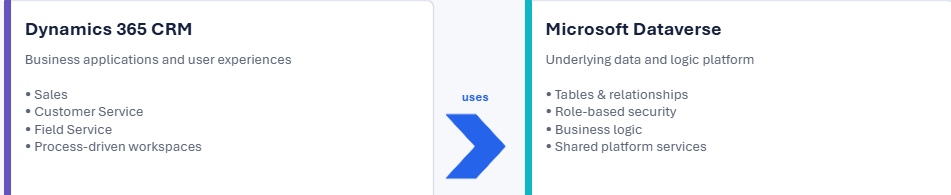
Although Dynamics 365 and Microsoft Dataverse work closely together, they serve different purposes.
What is Dynamics 365?
Dynamics 365 provides the business applications and business functionality.
Examples include:
- Dynamics 365 Sales
- Dynamics 365 Customer Service
- Dynamics 365 Field Service
These applications provide ready-made business processes, forms, dashboards, and business functionality.
What is Microsoft Dataverse?
Microsoft Dataverse is the underlying cloud data platform used by Dynamics 365 and Power Platform applications.
Dataverse provides:
- Tables
- Columns
- Relationships
- Security
- Business logic
- APIs
- Cloud data storage
Example
Suppose you are using Dynamics 365 Sales.
You may work with records such as:
- Account
- Contact
- Lead
- Opportunity
These business records are stored and managed using Microsoft Dataverse.
Dynamics 365 vs Dataverse
| Dynamics 365 | Microsoft Dataverse |
|---|---|
| Business applications | Cloud data platform |
| Provides business functionality | Stores and manages data |
| Sales, Customer Service, Field Service | Tables, columns, relationships |
| Primarily used through business applications | Supports apps, automation, and integrations |
Interview-Ready Answer
Dynamics 365 provides business applications such as Sales and Customer Service, whereas Dataverse is the underlying data platform that stores and manages business data. Dataverse also provides security, relationships, business logic, and APIs used by Dynamics 365 and Power Platform applications.
3. What are Tables in Dynamics 365 CRM?
Tables are used to store business data in Microsoft Dataverse.
In older Dynamics CRM terminology, tables were commonly called Entities.
Examples of Tables
| Table | Stores |
|---|---|
| Account | Company information |
| Contact | Customer information |
| Lead | Potential customers |
| Opportunity | Potential sales |
| Case | Customer support issues |
Types of Tables in Dataverse
Standard Tables
Standard tables are provided by Microsoft.
Examples include:
- Account
- Contact
- Lead
- Opportunity
- Case
- Task
Custom Tables
Custom tables are created based on specific business requirements.
For example, an organization may want to manage employee assets.
A custom table called Employee Asset could contain:
- Asset Name
- Asset ID
- Asset Type
- Assigned Employee
- Purchase Date
Components of a Dataverse Table
A table can include:
- Columns
- Relationships
- Forms
- Views
- Business Rules
- Business Process Flows
Interview-Ready Answer
A table in Dataverse is used to store business data. Tables can be standard tables provided by Microsoft or custom tables created based on business requirements. Each table contains columns, relationships, forms, views, and other components used to manage the data.
4. What are the Different Types of Relationships in Dynamics 365?
Relationships define how data from one table is connected to another table.
There are three main relationship types in Dynamics 365 and Dataverse.
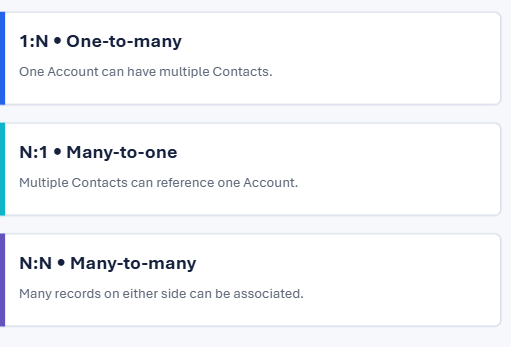
One-to-Many Relationship (1:N)
One record from Table A can be associated with multiple records from Table B.
Example:
One Account can have multiple Contacts.
Account
   |
   |------ Contact 1
   |------ Contact 2
   |------ Contact 3
Many-to-One Relationship (N:1)
This represents the reverse perspective of a One-to-Many relationship.
Multiple Contacts can belong to one Account.
Contact 1  \
Contact 2   ---> Account
Contact 3  /
Many-to-Many Relationship (N:N)
Multiple records from one table can be associated with multiple records from another table.
Example: Students and Courses
- One student can enroll in multiple courses.
- One course can have multiple students.
Interview-Ready Answer
Dynamics 365 supports One-to-Many, Many-to-One, and Many-to-Many relationships. A One-to-Many relationship allows one parent record to have multiple related records. Many-to-One represents the reverse relationship. Many-to-Many allows multiple records from both tables to be associated with each other.
5. What is a Solution in Dynamics 365?
A Solution is a container used to group, manage, transport, and deploy customizations and application components.
Solutions are extremely important for Application Lifecycle Management (ALM).
Components That Can Be Included in a Solution
A solution can contain:
- Tables
- Columns
- Relationships
- Forms
- Views
- Model-driven apps
- Canvas apps
- Power Automate flows
- Business Rules
- Business Process Flows
- Plug-ins
- JavaScript web resources
Example
Suppose you are developing a Customer Complaint Management System.
Instead of moving every component individually, you can package everything inside one solution.
Customer Complaint Solution
│
├── Complaint Table
├── Customer Table
├── Complaint Form
├── Complaint Views
├── Business Rules
├── Power Automate Flow
├── JavaScript
└── Model-Driven App
The solution can then be moved between environments.
Development → Test → Production
Interview-Ready Answer
A Solution is a container used to package and manage Dataverse and Power Platform components. It supports ALM by allowing us to move application customizations between environments such as Development, Test, and Production.
6. What is the Difference Between Managed and Unmanaged Solutions?
This is another frequently asked Dynamics 365 Developer interview question.
Unmanaged Solution
An unmanaged solution is generally used during development.
Key Characteristics
- Components can be modified.
- Developers can make changes directly.
- Suitable for development and customization.
- Used as the source for exporting managed solutions.
Managed Solution
A managed solution is generally used for controlled deployment to downstream environments.
Key Characteristics
- Provides controlled deployment behavior.
- Commonly used in Test and Production environments.
- Supports managed lifecycle and solution layering.
- Helps reduce uncontrolled direct changes.
Typical ALM Process
Development
(Unmanaged Solution)
        ↓
Export
        ↓
Managed Solution
        ↓
Test / UAT
        ↓
Production
Interview-Ready Answer
Unmanaged solutions are typically used in development because components can be freely customized. Managed solutions are commonly used for controlled deployment to downstream environments such as Test and Production. A good ALM approach is to develop in unmanaged solutions and deploy managed solutions where appropriate.
7. What are Business Rules in Dynamics 365?
Business Rules allow developers and functional consultants to implement certain business logic without writing JavaScript or plug-in code.
They are useful for implementing validations and field-level logic using a low-code approach.
What Can Business Rules Do?
Business Rules can:
- Set a column value
- Set a default value
- Make a column required
- Make a column optional
- Show an error message
- Show or hide fields
- Enable or disable fields
- Apply conditional logic
Benefits of Business Rules
- Low-code approach
- Easy to configure
- Easy to maintain
- Reduces unnecessary JavaScript for simple logic
Interview-Ready Answer
Business Rules allow us to implement validations and business logic without writing code. They can perform actions such as setting field values, making fields required, showing error messages, and controlling field behavior based on conditions.
8. What is the Difference Between Business Rules and JavaScript?
Both Business Rules and JavaScript can be used to implement logic in Dynamics 365, but they are suitable for different scenarios.
| Business Rules | JavaScript |
|---|---|
| Low-code configuration | Requires coding |
| Suitable for standard logic | Suitable for complex logic |
| Easy to maintain | Provides greater flexibility |
| Limited functionality | Advanced customization |
| Declarative | Programmatic |
When Should You Use Business Rules?
Use Business Rules when the requirement is simple.
Example:
If Status = Closed, disable the Comments field.
This type of requirement can often be implemented using a Business Rule.
When Should You Use JavaScript?
Use JavaScript when advanced client-side logic is required.
Examples include:
- Complex validations
- Calling APIs
- Custom form events
- Advanced form manipulation
- Dynamic filtering
- Complex calculations
- Custom notifications
Interview-Ready Answer
I use Business Rules for simple declarative validations and field behavior because they are low-code and easy to maintain. I use JavaScript when the requirement involves complex client-side logic, advanced form manipulation, custom events, or API interactions.
9. What is a Security Role in Dynamics 365?
Security Roles control what users can access and what actions they can perform within a Dataverse environment.
Dataverse uses a role-based security model where permissions and access levels determine what applications and data a user can access.
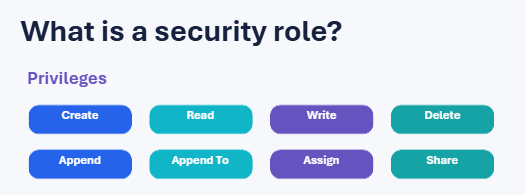
Common Security Privileges
- Create
- Read
- Write
- Delete
- Append
- Append To
- Assign
- Share
What is Append and Append To?
This is a frequently asked interview topic.
Append allows a record to be associated with another record.
Append To allows another record to be associated with the current record.
Example
To associate a Contact with an Account, appropriate permissions may include:
- Contact → Append
- Account → Append To
Access Levels
Depending on the table ownership model and privilege, access can be scoped at:
- User level
- Business Unit level
- Business Unit and Child Business Unit level
- Organization level
Security can also work together with:
- Business Units
- Teams
- Ownership
- Sharing
- Hierarchy access
Interview-Ready Answer
Security Roles are used to control user access in Dynamics 365 and Dataverse. They define privileges such as Create, Read, Write, Delete, Append, Assign, and Share. Access can be configured according to the organization’s security requirements and combined with concepts such as business units, teams, ownership, and sharing.
10. What is the Difference Between Workflow and Power Automate?
This question is important because many organizations have older Dynamics implementations alongside modern Power Platform automation.
Workflow and Dataverse Process Automation
Dynamics 365 and Dataverse include process automation capabilities.
In existing implementations, you may encounter workflows and other traditional Dataverse processes.
Examples include:
- Updating records
- Sending notifications
- Executing process steps
Power Automate
Power Automate is Microsoft’s modern automation platform for creating automated workflows.
It can integrate Dataverse with:
- Outlook
- SharePoint
- Microsoft Teams
- Excel
- Approvals
- Azure services
- External services and connectors
Example
New Lead Created in Dynamics 365
           ↓
Power Automate Trigger
           ↓
Send Email to Sales Team
           ↓
Create Follow-up Task
           ↓
Send Notification in Teams
Types of Power Automate Flows
- Automated Cloud Flows
- Instant Cloud Flows
- Scheduled Cloud Flows
- Desktop Flows
Interview-Ready Answer
Power Automate is the modern automation platform used to automate processes and integrate Dataverse with Microsoft and external services. In Dynamics 365 projects, we may also encounter existing Dataverse workflow-based processes. For modern cloud automation and integrations, Power Automate is commonly used because of its broad connector ecosystem and integration capabilities.
Frequently Asked Questions About Dynamics 365 CRM
Is Dynamics 365 CRM and Dataverse the same?
No. Dynamics 365 provides business applications such as Sales and Customer Service, while Dataverse is the underlying cloud data platform used to store and manage business data.
What are the most important Dynamics 365 interview topics?
Some important topics include:
- Dataverse
- Tables and columns
- Relationships
- Solutions
- Managed and unmanaged solutions
- Business Rules
- JavaScript
- Security Roles
- Power Automate
- Plug-ins
- Web API
- ALM
What is the old name for Dataverse tables?
Dataverse tables were commonly called Entities in older Dynamics CRM terminology.
Which automation tool is commonly used with Dynamics 365?
Power Automate is commonly used for modern cloud automation and integrations with Dynamics 365 and Dataverse.
Final Thoughts
Dynamics 365 CRM interviews usually begin with fundamental concepts before moving toward advanced topics such as plug-ins, JavaScript, Web API, integrations, security, Application Lifecycle Management, and custom development.
If you are preparing for a Dynamics 365 Developer or Power Platform Developer interview, make sure you have a strong understanding of:
- Dynamics 365 applications
- Microsoft Dataverse
- Tables and columns
- Relationships
- Solutions
- Managed and unmanaged solutions
- Business Rules
- JavaScript
- Security Roles
- Power Automate
Mastering these fundamental topics will help you build a strong foundation for both Dynamics 365 interviews and real-world projects.
What’s Next?
This is Part 1 of the Dynamics 365 CRM Interview Questions and Answers series.
In the next part, we can explore advanced topics such as:
- What are Plug-ins in Dynamics 365?
- Plug-in execution pipeline
- Pre-validation, Pre-operation, and Post-operation stages
- Dynamics 365 Web API
- JavaScript form events
- Business Process Flows
- Dataverse integrations
- Application Lifecycle Management (ALM)
- Azure Functions and Dynamics 365 integration
Stay tuned for Dynamics 365 CRM Interview Questions and Answers – Part 2!
Don’t Forget to Share!
If you found this article helpful, share it with your friends, colleagues, and anyone preparing for a Dynamics 365 CRM or Power Platform interview.
✨ Thanks for reading! ✨
I hope you found this blog on the Microsoft Power Platform helpful! From Power Apps, Power Automate (Cloud & Desktop), Canvas Apps, Model-driven Apps, Power BI, Power Pages, SharePoint, Dynamics 365 (D365), Azure, and more, I cover a wide range of topics to help you harness these powerful tools. Don’t miss out on future tips, tutorials, and insights—hit that subscribe button to get the latest posts right to your inbox. 💌
💬 I’d love to hear your thoughts! Drop a comment below with your questions, ideas, or feedback—let’s get the conversation started!
🔗 Let’s connect and grow together!
Follow me, Sanika Thorat, on your favorite platforms for even more content and updates on Microsoft Power Platform and related technologies:
- 💼 LinkedIn – Let’s network and share ideas!
- 💻 GitHub – Explore my projects and code.
- Email Id – thoratsanika98@gmail-com
Let’s build something amazing together with Power Platform and Azure! 🚀
What covered in youtube video
SEO DATA
#Dynamics365 #D365InterviewQuestions #Dynamics365CRM
Dynamics 365 CRM interview questions,
Dynamics 365 interview questions,
Dynamics 365 interview questions and answers,
D365 developer interview questions,
D365 interview questions 2026,
Dynamics 365 CRM interview questions 2026,
Microsoft Dynamics 365 interview questions,
Dynamics CRM interview questions,
D365 CRM developer interview,
Dynamics 365 developer interview,
Dynamics 365 CE interview questions,
Dataverse interview questions,
Microsoft Dataverse interview questions,
Power Platform interview questions,
Power Platform developer interview,
Power Automate interview questions,
Dynamics 365 solutions,
managed vs unmanaged solution,
business rules vs JavaScript,
Dynamics 365 security roles,
workflow vs Power Automate,
Dynamics 365 tables,
Dynamics 365 relationships,
CRM technical interview,
D365 interview preparation,
Dynamics CRM tutorial,
Microsoft Dynamics CRM,
Dynamics 365 for beginners,
D365 developer,
Dynamics 365 jobs
Dynamics 365 CRM interview questionsD365 developer interview questionsDynamics 365 interview questions and answersD365 interview questions 2026Dynamics 365 developer interviewDynamics 365 CRM interview questions 2026Microsoft Dynamics 365 interview questionsD365 CRM developer interview
Dynamics 365 CE interview questionsDataverse interview questionsPower Platform interview questionsD365 technical interviewDynamics CRM interview preparationDynamics 365 solutionsManaged vs unmanaged solutionsBusiness Rules vs JavaScriptWorkflow vs Power AutomateDynamics 365 security roles
Dynamics 365 CRM Interview Questions
Dynamics 365 CRM Interview Questions
Dynamics 365 CRM Interview Questions
Dynamics 365 CRM Interview Questions
Dynamics 365 CRM Interview Questions
Dynamics 365 CRM Interview Questions
Dynamics 365 CRM Interview Questions
Dynamics 365 CRM Interview Questions
Dynamics 365 CRM Interview Questions
Dynamics 365 CRM Interview Questions
Dynamics 365 CRM Interview Questions
Dynamics 365 CRM Interview Questions
Dynamics 365 CRM Interview Questions
Dynamics 365 CRM Interview Questions
Dynamics 365 CRM Interview Questions
Dynamics 365 CRM Interview Questions
1 thought on “Top 10 Dynamics 365 CRM Interview Questions and Answers 2026 | Part 1 | D365 Developer Interview”