Dynamics 365 Developer Interview Questions 2026 | Advanced Level | Part 2
Dynamics 365 Developer Interview Questions 2026 | Advanced Level | Part 2
1. What is a Plug-in in Dynamics 365, and When Should You Use It?
A plug-in in Dynamics 365 is a custom piece of server-side code that executes in response to a Dataverse event.
Plug-ins are generally written using C# and the Dataverse SDK for .NET.
For example, suppose a user creates an Opportunity. You may want to execute some custom business logic whenever the Opportunity is created, updated, or deleted.
A plug-in can be registered against messages such as:
- Create
- Update
- Delete
- Assign
- SetState
- QualifyLead
- Close
The exact messages available depend on the operation and table.
Why Do We Use Plug-ins?
The biggest reason to use a plug-in is when the business requirement needs server-side logic that should execute regardless of where the data change originates.
For example, a record might be created from:
- Dynamics 365
- Power Apps
- Power Automate
- Dataverse Web API
- An external integration
If the validation needs to apply consistently to the Dataverse operation, a plug-in can be a strong choice because the logic executes on the server as part of the Dataverse event pipeline.
Example
Suppose your business has this rule:
An Opportunity should not be closed unless the customer has an approved credit limit.
A user might try to close the Opportunity from Dynamics 365.
But what if an external application tries to close the same Opportunity through the Web API?
If this validation is implemented only on the user interface, the external application could potentially bypass it.
A server-side plug-in can enforce the rule at the Dataverse operation level.
Synchronous vs Asynchronous Plug-ins
Plug-ins can execute in either synchronous or asynchronous mode.
Synchronous Plug-in
A synchronous plug-in runs as part of the current operation.
The user or calling process generally waits for the plug-in logic to complete.
This makes synchronous execution suitable when the result of the logic needs to affect the current operation.
Example
User closes Opportunity
        ↓
Plug-in executes
        ↓
Check business conditions
        ↓
Conditions satisfied?
      /       \
    Yes        No
     ↓          ↓
Allow       Cancel
operation   operation
If the business condition is not satisfied, the plug-in can throw an appropriate exception and prevent the operation from completing.
Asynchronous Plug-in
An asynchronous plug-in runs through the asynchronous service after the triggering operation.
This is useful when the logic does not need to block the user’s transaction.
For example:
When an Account is created, send information to another internal processing system.
If the external processing does not need to happen before the Account is saved, asynchronous processing may be more appropriate.
Microsoft documents asynchronous plug-in execution as a PostOperation option that runs outside the database transaction.
2. Explain the Dynamics 365 Plug-in Execution Pipeline
The Dataverse plug-in execution pipeline describes the sequence through which a Dataverse operation passes before, during, and after the main system operation.
Understanding the pipeline is extremely important for a Dynamics 365 Developer because the stage you select determines when your code executes and what you can safely do at that point.

Microsoft currently documents four stages in the event execution pipeline:
- PreValidation
- PreOperation
- Main Operation
- PostOperation
1. PreValidation
PreValidation occurs before the main system operation.
For the initial operation, this stage occurs before the database transaction.
It is particularly useful when you want to validate a request and potentially cancel it before the main operation takes place.
Example
User attempts to delete Account
          ↓
PreValidation Plug-in
          ↓
Check business condition
          ↓
Condition satisfied?
       /       \
     Yes        No
      ↓          ↓
 Continue      Cancel
If the business condition fails, the plug-in can throw an exception and prevent the operation.
One important detail is that PreValidation isn’t always outside a transaction for every nested operation. Microsoft notes that operations triggered by extensions registered in other stages can enter the transaction of the calling operation.
2. PreOperation
PreOperation runs before the main system operation and within the database transaction.
This is commonly the stage you choose when you want to modify values before Dataverse saves the record.
Example
Suppose a user creates a Customer record but you want to automatically populate a field before the record is saved.
You could use a PreOperation plug-in.
Create Record
     ↓
PreOperation Plug-in
     ↓
Modify Target values
     ↓
Main Operation
     ↓
Record saved
Microsoft specifically recommends PreOperation when you need to change values for the entity involved in the message.
3. Main Operation
The Main Operation is where the core Dataverse operation is processed.
For example:
- Create
- Update
- Delete
The platform performs the actual operation at this stage.
Developers generally don’t register custom plug-in steps directly against the Main Operation stage.
Instead, custom logic is registered around the operation using stages such as PreValidation, PreOperation, and PostOperation.
4. PostOperation
PostOperation occurs after the main operation.
Synchronous PostOperation execution still occurs within the transaction.
This stage is useful when the record operation has already taken place and you need to perform logic based on the result.
Example
Create Account
      ↓
PreOperation
      ↓
Main Operation
      ↓
Account Created
      ↓
PostOperation
      ↓
Additional processing
PostOperation can also be registered for asynchronous execution. In that case, the asynchronous step runs outside the database transaction.
Plug-in Pipeline at a Glance
| Stage | Main Purpose | Transaction |
|---|---|---|
| PreValidation | Validate/cancel operation | Usually before transaction for initial operation |
| PreOperation | Modify data before save | Yes |
| Main Operation | Core Dataverse operation | Platform operation |
| PostOperation | Logic after core operation | Yes for synchronous execution |
| PostOperation Async | Background processing | No |
3. What is the Difference Between Pre-Validation, Pre-Operation, and Post-Operation Plug-ins?
This is one of the most common advanced Dynamics 365 plug-in interview questions.
The easiest way to understand the difference is to focus on when the plug-in runs and what problem it is solving.
| Stage | Typical Use |
|---|---|
| PreValidation | Validate or cancel an operation |
| PreOperation | Modify data before the core operation |
| PostOperation | Perform logic after the core operation |
| PostOperation Async | Perform background processing |
PreValidation – “Should this operation be allowed?”
Use PreValidation when the main goal is to validate the request and stop it when necessary.
Example
Do not allow deletion of a Customer if there are active Cases.
The plug-in checks the condition and cancels the operation if required.
PreOperation – “What should be saved?”
Use PreOperation when you need to modify the data before Dataverse performs the main operation.
Example
Automatically calculate and populate a classification value before an Account is created.
PostOperation – “What should happen after the operation?”
Use PostOperation when you need to perform processing after the main operation.
Example
After an Opportunity is created, create a related record or perform additional processing.
If the logic doesn’t need to block the user’s operation, an asynchronous PostOperation step may be considered.
Important Interview Point
Do not simply memorize:
PreValidation = validation, PreOperation = modification, PostOperation = after save.
That is a useful starting point, but real-world plug-in design also requires understanding transactions, nested operations, execution mode, recursion, performance, and error handling.
Microsoft notes that exceptions from synchronous plug-ins executing within the database transaction can roll back the transaction.
4. What are IPluginExecutionContext, IOrganizationService, and ITracingService?
This is an important C# and Dynamics 365 Developer interview question.
If you have actually developed Dataverse plug-ins, you will frequently work with these services.

The three most important concepts are:
IPluginExecutionContextIOrganizationServiceITracingService
IPluginExecutionContext
IPluginExecutionContext provides information about the current plug-in execution.
It allows you to understand things such as:
- Which message triggered the plug-in
- Which table is involved
- Which stage is executing
- Which user initiated the operation
- Input parameters
- Output parameters
- Shared variables
- Depth
- Correlation information
For example:
IPluginExecutionContext context =
    (IPluginExecutionContext)serviceProvider.GetService(
        typeof(IPluginExecutionContext));
InputParameters
InputParameters contains values passed into the current operation.
For Create and Update operations, the most important parameter is usually:
TargetFor example:
if (context.InputParameters.Contains("Target") &&
    context.InputParameters["Target"] is Entity target)
{
    // Work with target
}
This allows the plug-in to access the record involved in the operation.
IOrganizationService
IOrganizationService is used to interact with Dataverse data.
You can use it to:
- Retrieve records
- Create records
- Update records
- Delete records
- Execute requests
- Associate records
- Disassociate records
Example:
IOrganizationService service =
    (IOrganizationService)serviceProvider.GetService(
        typeof(IOrganizationServiceFactory));
In practice, the service is commonly created through IOrganizationServiceFactory, often using the user context or another appropriate identity.
ITracingService
ITracingService is used for diagnostic logging from plug-ins.
This becomes extremely useful when troubleshooting issues in a sandboxed or production environment.
Example:
ITracingService tracingService =
    (ITracingService)serviceProvider.GetService(
        typeof(ITracingService));

tracingService.Trace("Plug-in execution started.");
Instead of relying on Console.WriteLine(), developers can use tracing to help diagnose plug-in execution.
SharedVariables
SharedVariables can be used to pass information between steps in the execution pipeline.
For example, one plug-in can calculate a value and make it available to another plug-in step that runs later in the pipeline.
Microsoft documents SharedVariables specifically for passing data between stages of pipeline execution.
5. What is the Difference Between Dataverse Web API and Organization Service?
This is an important question for developers working on Dynamics 365 integrations.
Both the Dataverse Web API and SDK for .NET can be used to interact with Dataverse, but they provide different development experiences.
What is Dataverse Web API?
The Dataverse Web API is a RESTful API based on OData v4.
It uses standard HTTP methods such as:
- GET
- POST
- PATCH
- DELETE
It works with JSON and can be consumed from many programming languages and platforms.
Microsoft describes the Web API as an OData v4 RESTful service that provides a cross-platform development experience.
Example
A client application can send an HTTP request to Dataverse to retrieve an Account.
External Application
        ↓
HTTP Request
        ↓
Dataverse Web API
        ↓
Dataverse
What is Organization Service / SDK for .NET?
The Dataverse SDK for .NET provides a .NET programming model for interacting with Dataverse.
Developers working with plug-ins commonly use:
IOrganizationServiceto perform operations against Dataverse.
The Organization Service represents the platform’s underlying message-oriented operation model, while the Web API provides a RESTful interface to those operations.
Web API vs Organization Service
| Dataverse Web API | SDK / Organization Service |
|---|---|
| REST/OData | .NET SDK programming model |
| HTTP-based | .NET-based |
| JSON | SDK objects/classes |
| Cross-platform | Primarily .NET development |
| Useful for external applications | Common in plug-ins/server-side code |
| Uses GET, POST, PATCH, DELETE | Uses SDK requests and service methods |
6. What are Alternate Keys in Dataverse, and When Would You Use Them?
Every Dataverse record has a unique identifier, commonly represented by a GUID.
However, external systems don’t always know the Dataverse GUID.
This is where Alternate Keys become useful.
An alternate key allows you to identify a Dataverse row using one or more business columns that represent a unique identity.
Microsoft specifically recommends alternate keys for integration scenarios where an external system doesn’t store the Dataverse GUID.
Real-World Example
Imagine that an ERP system identifies customers using:
CustomerCode = CUST-10025Dataverse has:
Account GUID = 6f8a....The ERP system doesn’t know the Dataverse GUID.
Instead of forcing the ERP system to maintain the Dataverse GUID, you could define an alternate key based on the Customer Code.
ERP
 |
 | CustomerCode = CUST-10025
 ↓
Dataverse Alternate Key
 |
 ↓
Account Record
The Web API can then reference the record using the alternate key rather than the GUID. Microsoft provides examples of retrieving, updating, and deleting rows using alternate keys.
When Should You Use Alternate Keys?
Alternate keys are particularly useful when:
- Integrating Dataverse with ERP systems
- Integrating with legacy applications
- The external system has its own unique business identifier
- You don’t want external systems to depend on Dataverse GUIDs
- You need reliable record matching
7. What is a Custom API in Dataverse?
A Custom API allows developers to define their own API operation within Dataverse.
It is particularly useful when you want to expose a reusable business operation rather than requiring every caller to understand the underlying implementation.
Microsoft describes Custom APIs as a developer-focused way to create custom operations in Dataverse. They can be invoked through the Web API or Dataverse SDK and can also be called from Power Automate through the Dataverse connector.
Real-World Example
Suppose your organization has a customer approval process.
The approval requires:
- Validate customer data.
- Check credit information.
- Update multiple records.
- Create an approval history record.
- Return an approval result.
Instead of allowing every application to implement all these steps independently, you could expose one operation:
ApproveCustomerThe architecture could look like:
Power Apps
     ↓
Custom API
     ↓
Plug-in Logic
     ↓
Dataverse
Another application could invoke the same Custom API.
Why Use a Custom API?
Custom APIs are useful when:
- You need a reusable business operation.
- Multiple applications need the same business logic.
- You want a developer-oriented API surface.
- You want to centralize business logic.
- You need to expose a custom Dataverse operation.
A Custom API commonly uses a plug-in to implement its business logic, although a plug-in isn’t mandatory in every design.
Custom API vs Power Automate
Consider this scenario:
A Power Apps application needs to perform a complex business operation involving multiple Dataverse records.
You could create a Power Automate flow, but if the operation is fundamentally a reusable business operation exposed through Dataverse, a Custom API with appropriate server-side logic may provide a cleaner developer-oriented design.
8. What are Environment Variables and Connection References in Power Platform ALM?
This is a very practical question for Dynamics 365 and Power Platform developers.
When an application moves from Development to Test and then Production, certain configuration values usually change.
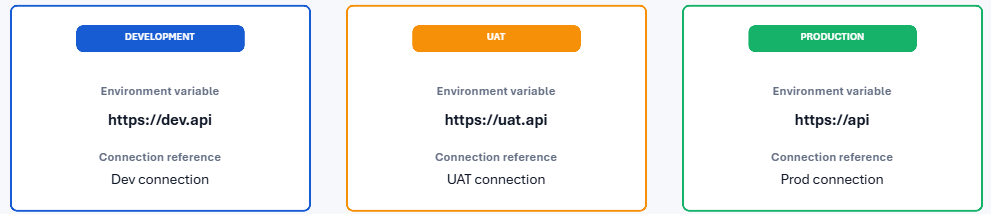
This is where Environment Variables are useful.
What are Environment Variables?
Environment variables allow you to separate configuration values from the application itself.
They are useful for storing environment-specific values such as:
- URLs
- Configuration values
- IDs
- API endpoints
- References to external resources
Microsoft describes environment variables as a key ALM capability for moving applications between environments while allowing environment-specific configuration to change.
Example
Development
    ↓
Environment Variable
    ↓
Dev API URL

Test
    ↓
Environment Variable
    ↓
Test API URL

Production
    ↓
Environment Variable
    ↓
Production API URL
The application doesn’t need to be redesigned for every environment.
What are Connection References?
A connection represents the authenticated connection to a connector.
A connection reference is a solution component that allows solution-aware apps and flows to refer to a connection in an environment-aware way.
For example, a Power Automate flow may use:
- Outlook
- SharePoint
- Dataverse
- SQL Server
Instead of tightly coupling the flow to a particular connection, the solution can use connection references.
During deployment, the appropriate connection can be mapped in the target environment. Microsoft documents connection references as a core part of solution-based ALM.
Environment Variables vs Connection References
| Environment Variables | Connection References |
|---|---|
| Store configuration values | Reference connector connections |
| Example: API URL | Example: SharePoint connection |
| Environment-specific configuration | Environment-specific authentication connection |
| Used by apps, flows, and other components | Commonly used by solution-aware flows/apps |
9. What are Solution Layers in Dataverse?
Solution layering is an advanced topic that becomes important when working with multiple solutions and environments.
If you have already learned about managed and unmanaged solutions in Part 1, the next question is:
What happens when multiple solutions customize the same component?
The answer is solution layering.
Microsoft describes Dataverse as having an unmanaged layer and managed layers. When multiple managed solutions are installed, the most recently installed managed solution is above previously installed managed solutions. Depending on the component, conflicts may follow “last one wins” behavior or merge logic.
Unmanaged Layer
Unmanaged customizations exist in the unmanaged layer.
For example:
Developer customization
        ↓
Unmanaged Layer
An unmanaged layer can take precedence over managed layers for many components.
This is one reason why making direct unmanaged customizations in a Production environment can create unexpected behavior.
Managed Layers
Managed solutions create managed layers.
Imagine Production contains:
System Layer
     ↓
Managed Solution A
     ↓
Managed Solution B
The later managed solution can sit above the earlier managed solution.
Simple Example
Suppose Solution A changes a field’s behavior.
Then Solution B is imported and changes the same component.
The resulting behavior may depend on the component and solution layering rules.
This is why understanding solution layers is important when troubleshooting unexpected behavior.
Why Are Solution Layers Important?
They help developers understand:
- Why a component behaves differently between environments.
- Which solution is controlling a component.
- Why an imported solution isn’t producing the expected behavior.
- How customizations from different solutions interact.
- Why unmanaged customizations can cause deployment problems.
10. How Would You Design ALM and CI/CD for a Dynamics 365 Project?
This is one of the most important advanced Dynamics 365 Developer interview questions.
Instead of simply asking:
What is ALM?
A senior-level interviewer may ask:
How would you design an ALM and CI/CD process for a Dynamics 365 project?
This tests whether you understand how development works in a real organization.
What is ALM?
Application Lifecycle Management (ALM) is the process of managing an application from development through testing, deployment, maintenance, and future updates.
A typical Dynamics 365 / Power Platform ALM process might look like:
Developer
    ↓
Development Environment
    ↓
Source Control
    ↓
Build Pipeline
    ↓
Test / UAT
    ↓
Production
Microsoft’s current Power Platform ALM guidance supports approaches involving solutions, Git/source control, pipelines, Azure DevOps, GitHub Actions, and automated deployments.
Step 1: Development Environment
The solution should contain the required application components.
Developers should build and test changes in a dedicated Development environment.
For example:
- Tables
- Columns
- Forms
- Views
- Plug-ins
- JavaScript
- Power Automate flows
- Custom APIs
Step 2: Solutions
Development work should be organized using solutions.
The solution acts as the deployment unit for the application components.
Developers can make changes in Development and prepare the solution for deployment.
Step 3: Source Control
For a mature development team, source control is extremely important.
Git can be used to maintain:
- Solution source
- Plug-in code
- JavaScript
- Configuration
- Deployment scripts
- Pipeline definitions
Microsoft currently provides Power Platform ALM tooling for Azure DevOps and GitHub Actions, and Dataverse also has Git integration capabilities.
Step 4: Build Pipeline
The build pipeline can automate tasks such as:
- Validate solution
- Export solution
- Unpack solution
- Run code quality checks
- Build plug-in assemblies
- Generate deployment artifacts
- Package the solution
This reduces manual errors.
Step 5: Test / UAT Environment
After the build is successful, deploy the solution to a Test or UAT environment.
The testing team can validate:
- Functional requirements
- Security
- Integrations
- Business logic
- Plug-ins
- Power Automate flows
- Performance
Only after successful validation should the solution move toward Production.
Step 6: Production Deployment
The final deployment can be automated through a release pipeline.
A typical process could be:
Development
      ↓
Git Repository
      ↓
Build Pipeline
      ↓
Test / UAT
      ↓
Approval
      ↓
Production
Power Platform supports deployment automation through Power Platform pipelines as well as Azure DevOps and GitHub Actions-based approaches.
Where Do Environment Variables and Connection References Fit?
For example:
They are extremely important in this architecture.
Solution
   |
   |---- Environment Variables
   |
   |---- Connection References
   |
   |---- Tables
   |
   |---- Plug-ins
   |
   |---- Power Automate Flows
   |
   |---- Custom APIs
When the solution moves from Development to Production:
Development
     ↓
Dev Configuration
     ↓
Test Configuration
     ↓
Production Configuration
The application components remain largely the same while environment-specific values and connections are mapped appropriately.
Managed vs Unmanaged in ALM
A common approach is:
Development
     ↓
Unmanaged Solution
     ↓
Source Control / Build
     ↓
Managed Deployment Artifact
     ↓
Test
     ↓
Production
The exact ALM architecture depends on the organization’s governance model, but the key idea is to avoid treating Production as another development environment.
Azure DevOps vs GitHub Actions
Both can be used to automate Power Platform deployments.
Azure DevOps
Useful when the organization already uses:
- Azure Repos
- Azure Pipelines
- Work items
- Release management
- Enterprise DevOps processes
Microsoft provides Power Platform Build Tools for Azure DevOps.
GitHub Actions
Useful when the organization uses GitHub for:
- Source control
- Pull requests
- CI/CD
- Workflow automation
Microsoft provides GitHub Actions for Power Platform solution build and deployment scenarios.
So, if you’re preparing for a Dynamics 365 Developer or Power Platform Developer interview, make sure you follow the series.
Keep learning, keep building, and keep growing! 🚀
✨ Thanks for reading! ✨
I hope you found this blog on the Microsoft Power Platform helpful! From Power Apps, Power Automate (Cloud & Desktop), Canvas Apps, Model-driven Apps, Power BI, Power Pages, SharePoint, Dynamics 365 (D365), Azure, and more, I cover a wide range of topics to help you harness these powerful tools. Don’t miss out on future tips, tutorials, and insights—hit that subscribe button to get the latest posts right to your inbox. 💌
💬 I’d love to hear your thoughts! Drop a comment below with your questions, ideas, or feedback—let’s get the conversation started!
🔗 Let’s connect and grow together!
Follow me, Sanika Thorat, on your favorite platforms for even more content and updates on Microsoft Power Platform and related technologies:
- 💼 LinkedIn – Let’s network and share ideas!
- 💻 GitHub – Explore my projects and code.
- Email Id – thoratsanika98@gmail-com
Let’s build something amazing together with Power Platform and Az